Browse abandonment is the moment a shopper opens a product page, reads enough to care, and leaves without adding anything to the cart. The browse abandonment email follows a few hours later, a short reminder about that exact product for the people your store can identify.
It's the earliest signal a store gets and the easiest to act on, because the visit already happened. Nothing extra was spent to bring these shoppers in, and a good browse flow respects the gap between interest and commitment.
This guide stays with the shopper who viewed and left without carting, and with the price change that earns the same product a second look. Shoppers who add to cart belong to cart abandonment recovery, and waitlisted items to back-in-stock alerts. Those boundaries matter, because automated emails about one product in a single week turn a helpful nudge into pressure.
A product view is the cheapest buying signal a store gets
Product views outnumber carts many times over in a typical store's analytics, which makes the browse flow the broadest recovery channel a store can run. Klaviyo, which sells email and SMS marketing software, reports a 0.96 percent conversion rate for browse abandonment emails, against 0.10 percent for its average campaign and 3.55 percent for cart flows. The vendor sells the software it measures, and the shape still holds.
The flow earns its place on reach and timing. Cart recovery closes a decision already in progress and should win on revenue per send. Browse reaches people earlier, often weeks before they appear in a cart report, and in far greater numbers.
The reach has a built-in limit. Browse flows fire on a tracking event, and only shoppers the platform can recognise generate one, through a past order, a signup or an accepted cookie. Everyone else browses anonymously, which for most stores means most first-time traffic.
Picture a bicycle store on an ordinary Tuesday. A few hundred people drift through the product pages, two dozen add something to a cart, and six buy by the weekend. The people in between are exactly who the flow is for.
How browse abandonment differs from cart recovery
A cart email talks to someone who chose an item and paused before paying, and a browse email talks to someone still weighing whether the product deserves attention. The flows share suppression rules because shoppers move between them.
The economics differ in the same direction. Attribuly, a company that sells ecommerce analytics software, compares the two triggers and finds the same split most teams report. Cart abandonment wins for fastest revenue recovery, and browse wins for reach, discovery and capturing identity earlier.
FlowCart, an agency that builds these flows for Shopify stores, is blunter about the size of the prize.
"It's a genuinely useful flow and a genuinely minor one: it earns a fraction of what abandoned cart does, because browsing is weak intent. We build it with onsite tracking verified first, filters tight enough to matter, and suppression rules so nobody receives three emails about the same product."
A shopper reads about a lamp on Monday, carts it Tuesday, buys it Thursday, and a browse sequence still sending through that week turns its final email into an apology. Adding to cart removes someone from the flow, placing an order does the same, and the platform re-checks both before every send. The receiving side is covered in AI cart recovery for Shopify and Klaviyo.
Which triggers are worth building
The flow needs a trigger that fires reliably and filters that keep the wrong people out. In Klaviyo, the browse trigger rides on a metric called Viewed Product, so most of the setup work is tracking work. When the metric stops recording, the flow goes quiet however good the emails are.
The tracking check comes first
Open the analytics side of the platform, find the Viewed Product metric, and look at the past week. A line that goes flat at the right edge usually means a theme update, an app change or a duplicate tracking script stripped the event. RunPlaybook's walkthrough flags the same tell, and Shopify documents the product_viewed event underneath.
Klaviyo's guide to creating a browse abandonment flow covers the toggle that turns tracking on for a Shopify store. The filters matter as much as the trigger, and Klaviyo applies profile filters on entry and again before every email, so keeping out anyone who has carted or ordered takes a short list.
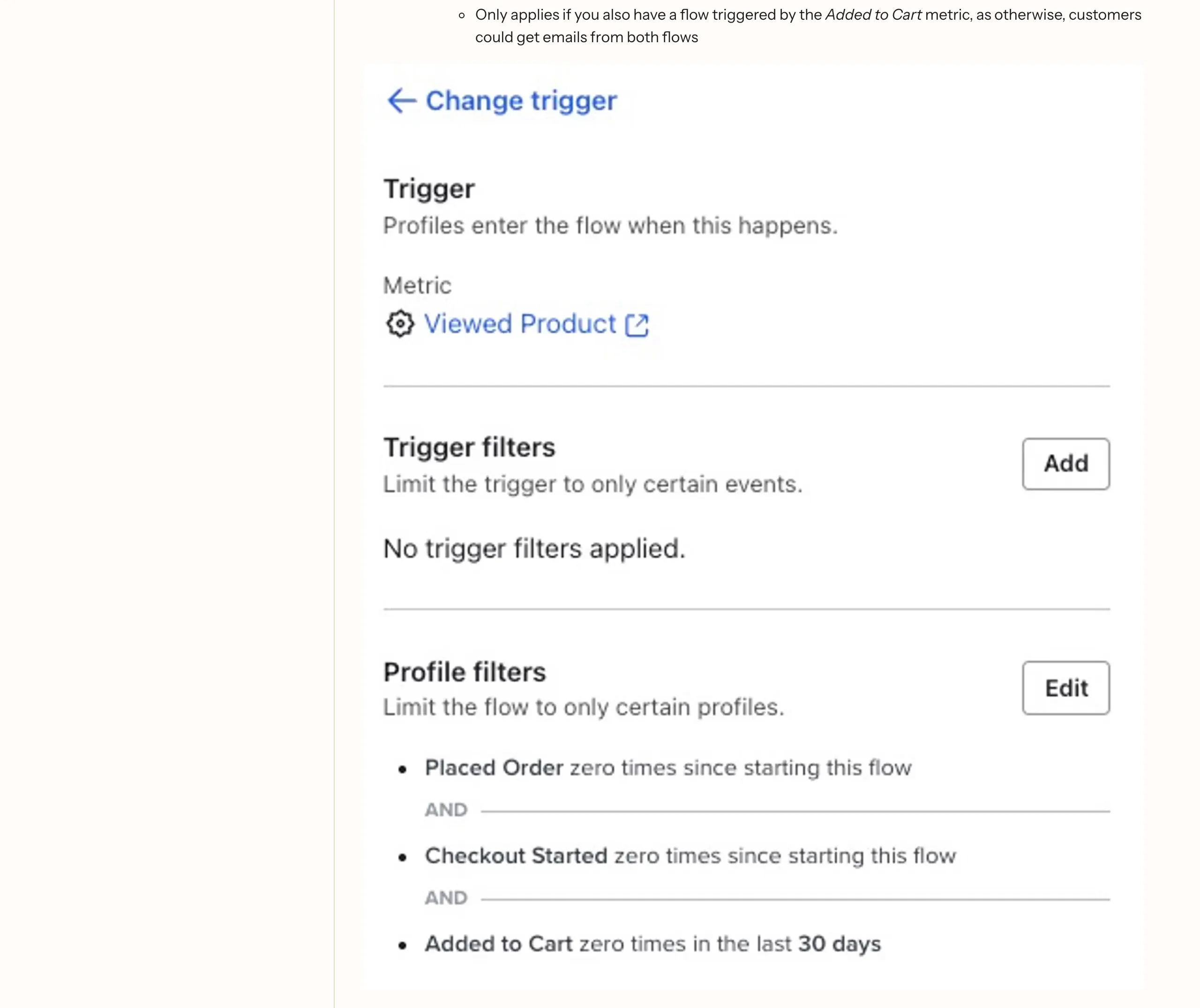
The Viewed Product trigger and its filters in Klaviyo's guide, captured on 20 September 2026.
The price change that earns a second look
A price drop alert fires when the number changes on a product someone viewed earlier, and its value comes from timing. The shopper showed interest at the old price, and the platform catches the moment that price stops being the obstacle. Klaviyo's price drop flow notes explain the exclusions, so nobody who already bought the item receives one.
PushOwl, which sells ecommerce marketing tools for Shopify stores, adds rules worth borrowing. Send within the hour of the price change, while the discovery feels current, and cap alerts at one per product per customer every fourteen days.
| Trigger | What fires it | Where the follow-up lives |
|---|---|---|
| Viewed product | A known shopper opens a product page and leaves without carting | The browse abandonment flow, built on the Viewed Product metric |
| Price drop | The price changes on a product they viewed earlier | A price drop flow listening to the same interest signal |
| Back in stock | A sold-out product returns and someone asked to be told | The waitlist flow, run separately from browsing |
The sequence, email by email
A browse flow runs shorter than a cart sequence on purpose. Cart recovery chases a decision in progress, while a browse follow-up works on interest, and interest cools quickly. Keep the exchange to two or three emails and get out of the way.
The first send shouldn't be instant. Hold it for a few hours, which gives the shopper room to come back on their own and lets the email arrive as a gentle coincidence. Agency walkthroughs commonly land on two to six hours after the view.
| Timing | Trigger context | Job of the email | Stop rule | |
|---|---|---|---|---|
| First reminder | 2 to 6 hours after the view | A known shopper viewed a product and left without carting | Put the exact product in front of them with one clear link | Skip anyone who has carted or bought since the view |
| Second email | The next day | The reminder went out and nothing changed | Answer the hesitation with reviews, sizing or delivery detail | The same cart and purchase checks run before this send |
| Third email | Two to three days after the second | Still no cart, still no order | One last soft nudge, or the closest alternative product | The sequence ends here, with nothing more about that product |
| Price drop alert | Within the hour of the price change | The price falls on a product viewed earlier | Pass on the saving while it's fresh | One alert per product per shopper every fourteen days, none after a purchase |
The stop rules carry the weight
A purchase check runs before every email, which is why someone who bought on Tuesday never gets asked on Wednesday to reconsider. Threadpoint's build notes are emphatic on that point, having watched brands email people who already bought. Geysera's setup guide adds the filter that pauses the sequence for anyone who starts checkout.
When the viewed product sells out mid-flow, the sequence can't sell it any harder, so end early or shift the final nudge to a related product where the platform supports it.
What the first email should say
The first email has one job, and it isn't persuasion. It puts the product back in front of someone whose browsing said "not yet" and makes the return trip effortless. Everything else is decoration.
Wording decides whether the email lands as service or as surveillance. The version that works sounds like a shop assistant who remembers a face. What fails is performed familiarity, quoting the session back and treating a page view like a promise. Loyalsend, an ecommerce messaging vendor, puts it plainly, since anything that feels like the store watching will undo the flow's credibility.
Inside the message, the parts that matter can be generated automatically. A dynamic product block, the template feature that pulls a product's image, name, price and link into the email, does the heavy lifting, and design guides for these emails agree it carries the message. Add a line of warmth in the store's own voice and one button back, and the email is done.
Subject lines work the same way, by being specific and calm. For the bicycle store, "Your size is back in the Raven jacket" does the job because it names a product and applies no pressure. The ones to retire perform excitement, with countdown energy and stacked exclamation marks.
The discount question comes up with every browse flow, and the default answer is no. A shopper who only looked hasn't committed to anything, and a code that arrives after a glance teaches the list to browse and wait for one. OneOnic's guidance on the discount debate, from a team that sells Shopify email tooling, suggests testing any discount against a no-discount version first. An experiment can earn its place; a default never does.
How often to send, and when to stay quiet
Frequency is where browse flows earn their reputation or spend it. Picture a shopper comparing four lamps on a Sunday evening. Every view fires the trigger, and without a ceiling the inbox holds a pile of reminders by Monday.
At the flow level, a frequency setting limits how often one person can receive messages, so a multi-product session produces one email. Klaviyo's Smart Sending adds a ceiling on total messages in a window, and Omnisend, which sells email marketing to ecommerce stores, recommends spacing browse messages ten to fifteen days apart. A re-entry filter stops someone who browsed last week from beginning the flow again this week.
List health argues for the same restraint. Email List Validation, a service that checks contact lists for deliverability risk, makes the case that steady messaging to people who never convert wears down engagement and invites spam complaints. One useful reminder a week beats three ignored ones.
Permission sits underneath all of it. Barilliance, which sells browse-abandonment software, treats permission as the first step in any browse campaign, and consent is the practical form that takes. Shopify's Customer Privacy API exists so tracking follows each visitor's choices, and the flow should inherit them. If a shopper declined tracking, the flow shouldn't know they were there.
Staying quiet is a decision the flow makes continuously. A buyer drops out, a shopper who carts hands over to cart recovery, and someone who browsed three months ago and never returned has graduated into win-back flows for lapsed customers.
Reading the flow's numbers in the first 30 days
Before the flow goes live, write down the baseline. Note the store's email revenue for the past month, the messages sent, and the level of the Viewed Product line. Thirty days later, those notes are the only honest comparison available.
Sends should go out in numbers that track the identified views, with nobody double-messaged by the cart flow. Beyond that, revenue per recipient deserves the closest watch, since it folds opens, clicks and conversion into one figure. Klaviyo's flow benchmark guide, built from thousands of customer accounts, sorts that figure into percentile bands by average order value. Klaviyo sells email and SMS marketing, so read the bands as a vendor reference and lean on your own trend line first.
The measurement worth trusting most is the one most stores skip. Attribuly's comparison recommends randomised holdouts, keeping a slice of the audience out of the flow so the revenue it claims gets weighed against a control group that never received anything. A flow that beats its holdout is working.
Expect the first month to be quiet. Browse flows surface their value slowly, in returning sessions and smaller orders, and thirty days catches the beginning.
Run the arithmetic on your own store
The case rests on numbers a store already has. Start with identified product views from last month, the count of people the platform recognises who viewed without carting. Take the store's average order value, and pick a deliberately conservative return rate, something like one in a hundred. Multiply the views by the rate and the order value, and the result is the flow's floor, revenue that arrives with no new acquisition spend. If that floor clears the cost of setting up, which for most stores is a subscription already being paid, the business case writes itself.
Before launch, the checklist is short.
- Confirm the Viewed Product metric is firing, and fix the tracking if the line is flat.
- Build the sequence with its exclusions, so recent carters and buyers never enter.
- Set the frequency caps at the flow level and in the platform's sending rules.
- Leave it alone for thirty days, and read the reports against the baseline.
This is the kind of flow we build at Supernodes, usually inside a two-week pilot that verifies the tracking, designs the sequence with its stop rules, and reads the first month with you. If your store attracts more browsers than your inbox talks to, speak with us.
Frequently asked questions
What is a browse abandonment email?
A browse abandonment email is an automated message sent to someone who viewed a product and left without adding it to the cart. The flow fires on the product view itself, so it reaches more people at an earlier stage of interest than cart recovery can. It goes only to shoppers your store can identify by email, and it works best as a short reminder of the exact product they looked at.
How does browse abandonment differ from cart abandonment?
Cart abandonment follows someone who added an item and left before paying, a serious signal, and its flows recover revenue fast. Browse abandonment follows a product view with no cart, so the intent is lighter and the sequence runs shorter and softer. The flows share suppression rules, so a shopper who carts after browsing stops receiving browse emails and starts receiving cart emails.
How long should I wait before the first browse abandonment email?
Most working setups send the first email between two and six hours after the product view. An instant send feels like being watched, and it interrupts shoppers who may still be deciding. The hours also give the shopper a chance to return and buy on their own first.
Should browse abandonment emails include a discount?
Not in the first email by default. A shopper who only looked hasn't committed to anything, and a code that follows a glance trains the list to browse and wait, eroding margin on orders that would have happened anyway. If you test one, measure it against a no-discount version and keep discounts for the flows where intent is proven, such as cart recovery and win-backs.
How long does it take to get a browse abandonment flow running?
The flow can be live in an afternoon once Viewed Product tracking is confirmed and firing. Treat two weeks as the realistic window for the full job, covering tracking verification, the trigger and its filters, the frequency rules, and the first read of the numbers. The tuning continues as the data arrives.