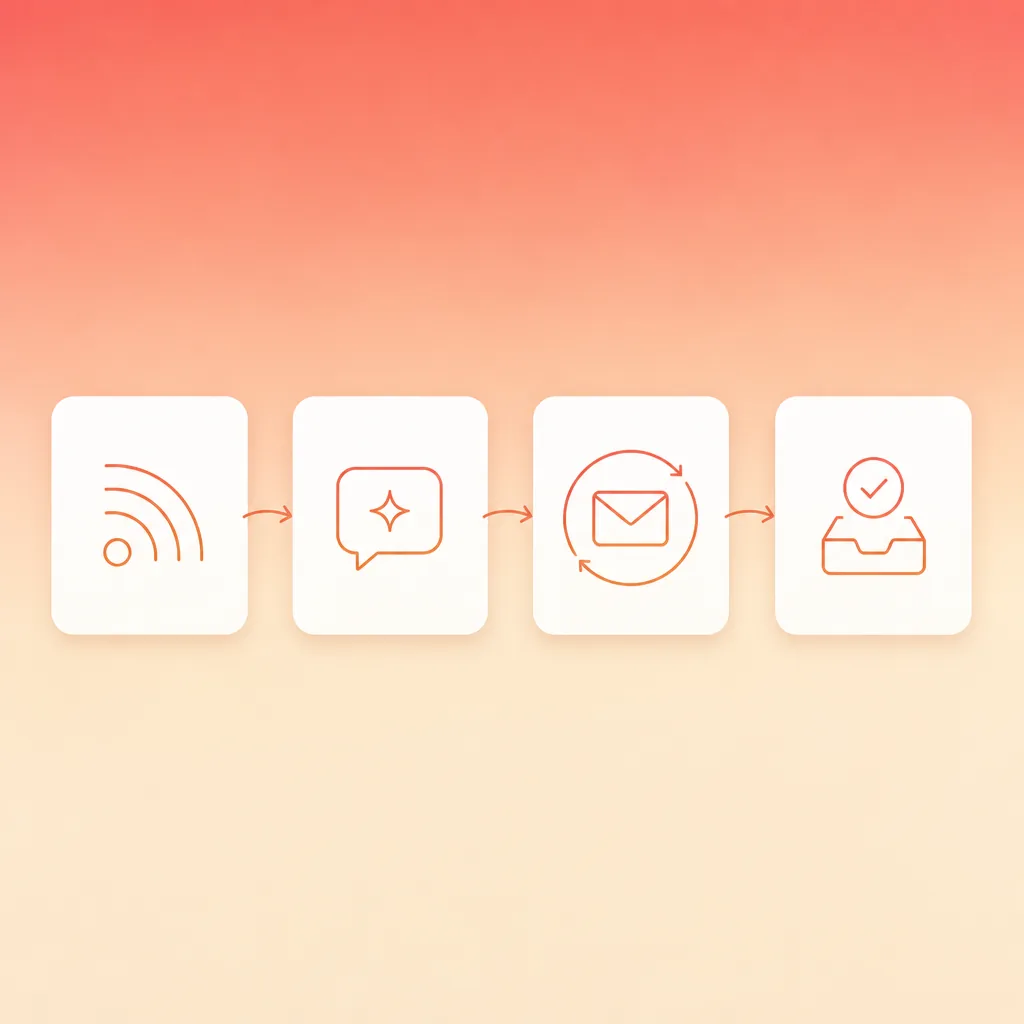
Newsletter automation runs as one fixed loop: a feed supplies the items, AI drafts the issue, a person approves it, and the sending platform delivers it on schedule. Ten minutes of review a week keeps that draft sounding like you.
That loop is the difference between a weekly send that happens and a weekly send that eats your Tuesday. Publishers sent 28 billion newsletter emails last year to more than 255 million readers, according to beehiiv's State of Newsletters 2026 report, drawn from the newsletter platform's own publisher data. Email still returns around USD 36 for every USD 1 spent, the number Litmus puts on the channel. The bottleneck is production, and for many creators the issue still eats a large slice of the month.
A workflow where the boring parts run themselves changes that. HubSpot's State of Newsletters survey of more than 400 newsletter professionals found 28 per cent use AI for brainstorming and planning and 25 per cent use it to write copy, with early adopters reporting one to three hours saved a week, while 4 per cent have no plan to use it at all. Week-by-week drafting sits in that first group, and the same beehiiv report has open rates holding above 41 per cent even as inbox volume climbs. The hard part is keeping the writing in your voice, because that is what readers stay for and it is the one thing a feed cannot supply.
This guide builds the middle path: one RSS feed supplies the raw material, ChatGPT does the drafting, ActiveCampaign handles the send, and you keep a ten-minute review gate so the voice stays yours. Anyone with a ChatGPT subscription and an ActiveCampaign account can set this up in an afternoon, then spend the saved hours on the parts that actually grow the list.
What a self-running newsletter looks like
A self-running newsletter has a fixed loop: the feed updates, the AI drafts, a human approves, the platform sends. None of those steps is new on its own, but chaining them removes the weekly restart, and that is where the time goes. Setting the RSS-to-email piece up in ActiveCampaign's RSS campaign flow takes about 15 minutes once you have the feed URL, because the RSS block pulls each new item in automatically. Production questions dominate the format, which is why HubSpot's State of Newsletters report, built from a survey of more than 400 newsletter professionals, spends most of its length on how issues get made.
beehiiv's 2026 report shows reader attention has held up even as newsletter volume climbed. What keeps a subscriber is a voice they recognise, and that is the part a feed cannot hand you.
What the loop does not do is replace judgment. Subscribers who feel the assembly line leave, and no automation buys that trust back. The loop earns its keep by making the draft cheap, so the human review becomes the only real cost, and ten minutes of it is enough.
The three levels of newsletter automation
Newsletter automation means software assembles the issue and a schedule delivers it, so the weekly send stops depending on somebody remembering. The term covers three levels, and they differ in how much control you hand over. Pick the level that matches the oversight you can commit to, because each one trades effort for control.
| Level | How the issue gets made | What it costs you | Where it fits |
|---|---|---|---|
| Feed auto-publish | The platform watches your feed and sends new items with no draft and no approval | No editorial control, so one weak post reaches the list unfiltered | High-volume content sites where the feed is the product |
| AI-drafted with a review gate | A feed supplies the items, AI drafts the issue in your voice, a person approves it before the send | Ten minutes of review each cycle, and somebody has to hold that time | Most company newsletters, including the workflow below |
| Manual broadcast | Somebody writes the issue from scratch and schedules the send by hand | Two to five hours a week, which is the cost this workflow removes | Launches and announcements where the writing is the point |
The middle level is where most teams land after trying both extremes. Feed auto-publish fails the first time it ships something you would have cut, and manual writing is the reason the newsletter gets skipped in a busy week.
What this workflow runs on: ChatGPT, a feed and ActiveCampaign
RSS stands for Really Simple Syndication, the standard way sites publish updates as machine-readable files, and you will meet it in step one.
| Tool | Role in the workflow | What you need |
|---|---|---|
| ChatGPT | Writes the weekly draft from feed items and your voice brief | A paid plan for custom instructions and saved projects; the free tier works for a one-off test |
| RSS feed | Supplies the raw material, usually your own blog or one source you read weekly | Most platforms expose one at /feed or /rss |
| ActiveCampaign | Holds the list, builds the email and sends it on schedule | Any plan with campaigns and automations; free trial available |
| Calendar reminder | Keeps the review gate honest | Your normal calendar, 10 minutes, same time weekly |
Step 1: Pick a feed worth automating
The feed is the raw material, so choose one that produces at least one new item a week. Your own blog feed is the cleanest start, because you control the quality and the cadence. A single industry source you already read weekly works just as well.
Find the feed URL
WordPress sites expose their feed at /feed. Substack and Medium publish /feed by default. For anything else, look for the RSS icon on the site or check the page source for a link with type="application/rss+xml".
Test the feed in a browser
Paste the URL into a browser. You should see XML with repeated item entries, each carrying a title, a link and a date. If the page renders as a normal website instead, you have the wrong URL.
Check the cadence
A feed that updates daily powers a weekly digest easily. A feed that updates monthly needs a monthly issue instead, or you will send thin emails. ActiveCampaign's guide to using RSS with campaigns shows how the RSS content block pulls the newest item in automatically, and the RSS integration page covers the same flow from the connector side.
Step 2: Teach ChatGPT the newsletter voice
Voice is the retention driver, and it is the one thing the feed cannot supply. The newsletters that keep subscribers are voice-driven first, which is why the setup below starts with a brief. The prompt comes second.
Write a voice brief
Five lines is enough: who the reader is, what the issue promises each week, your tone in three words, the words you never use, and your sign-off. We walk through the full method in our guide to training an AI on your brand voice, including how to cap the brief so the model actually follows it.
Load it into custom instructions
In ChatGPT, open Settings, then Personalisation, then Custom instructions. Paste the brief into the second box (the one about how you want ChatGPT to respond) and save. From here the brief applies to every conversation, which is what makes the weekly repeat consistent.
Test against three past issues
Give ChatGPT three of your best past issues plus five raw feed items, and ask for a draft in the same voice. Adjust the brief until the draft sounds like you, not like a competent stranger. Simple AI Tutorials' ChatGPT newsletter guide makes the same point: give ChatGPT a clear structure and you get useful output on the first try.
Step 3: How newsletter automation AI turns one feed into a draft
This is the core of the workflow. Once a week you open the feed, pick three to five items that fit the promise, and run the same prompt. Keep the prompt fixed so the output structure stays stable and the review gets faster.
The starting point we use
You are the editor of [newsletter name], written for [reader] who [promise].

Draft this week's issue from the items below:
1. Intro hook, one sentence, referencing this week's theme.
2. One short section per item, max 90 words each, each stating a clear opinion.
3. A call to action at the end that points back to [goal].

Voice rules from my custom instructions apply. No hype words. Plain English.

Items:
[Paste the feed items here]
Pull the week's items
Open the feed and copy the three to five items that serve your reader, not the ones that are easiest to paste. The curation is the job the AI cannot do.
Run the draft prompt
Paste the items into the prompt above, and ChatGPT returns the hook, the sections and the call to action in one pass. The split that works is simple. You own the opinion in each section, and the model handles the hook, the tightening and the reformatting.
Ask for five subject lines
Follow up with a second request: five subject lines, under 45 characters each, no clickbait. Explicit constraints matter here, because open-ended subject line requests return the same generic patterns from everyone. We covered the wider personalisation angle in our piece on email personalisation with ChatGPT and Mailchimp.
If you want the drafting itself scheduled, The AI Advantage Club's ChatGPT Tasks guide shows how ChatGPT can email a digest to you on a schedule. That pattern is for personal briefings, not subscriber sends, which is where step four comes in.
Step 4: Route the draft into ActiveCampaign
ActiveCampaign gives you three ways to connect the feed and the send, and they differ in how much control you keep. Pick the one that matches how much you trust the feed.
Use an RSS-triggered campaign
This is the most automated option: the campaign type fires whenever a new item appears in the feed, with no human in the loop. The Send New Blog Posts recipe shows the batching option, which groups posts into a digest on a set day and time, and batching beats immediate sends in practice.
Or build a standard campaign
The standard campaign type is the broadcast email, which ActiveCampaign's campaign types overview describes as the one you use to send a newsletter. Paste the approved AI draft into the email builder, pick the list and the schedule, and send. This path keeps the review gate firmly in the middle.
Let Active Intelligence wire it for you
ActiveCampaign's automation agent understands plain-language requests. The documentation for RSS-triggered workflows with Active Intelligence shows the prompt: "Create an automation when a new item is added to my feed, send an email." The agent builds the automation, and you inspect it before it goes live.
Teams that need full programmatic control can skip the UI entirely and use the ActiveCampaign API to create and send campaigns, which is the route to take when the newsletter is one leg of a larger pipeline. For the same automation mechanics on the sales side, our ActiveCampaign nurture workflow for trial users shows how the triggers and branches fit together.
Step 5: Keep a 10-minute human review gate
An AI draft needs a human edit before it ships. Creaitor's AI newsletter guide calls these drafts "smart first drafts that just need editing and a fact-check", and the review gate is where that editing happens.
Check the claims
Every number, name and link in the draft gets verified at the source before sending. This takes two minutes and it is non-negotiable, because an error in a newsletter is an error in front of every subscriber.
Read it out loud
If a sentence trips you, fix it. The draft should sound like you talking, not like an article about the topic. Your voice is the retention driver, and the reader can feel the difference.
Approve and schedule
Once the draft passes, the schedule is already set in ActiveCampaign. The gate stays in place even when the automation is running smoothly, because the cost is ten minutes and the cost of skipping it is churn.
Step 6: Measure what the newsletter actually does
A self-running send needs self-running measurement. Track these four numbers against your own trend as well as the industry averages, because a small list with high intent beats a big list that ignores you.
| Metric | What it tells you | Benchmark to watch |
|---|---|---|
| Open rate | Whether the subject line earned the open | 35.63 per cent all-users average, 29.81 per cent for ecommerce |
| Click rate | Whether the content earned the click | 2.62 per cent all-users average |
| Reply rate | Whether readers feel the voice | No universal benchmark; track your own trend |
| Unsubscribe rate | Whether the promise is drifting | Watch for a rising trend week over week; it means the promise is drifting |
The benchmarks above come from Mailchimp's email marketing benchmarks, and ActiveCampaign's email marketing statistics roundup is worth a read for the channel-level case. Once the numbers are in, connect behaviour to the next send: Ruzuku's guide to ActiveCampaign automations shows how subscribers who click a link get a different follow-up from those who do not, which is where a newsletter starts working as a funnel. We mapped the full lifecycle in our email lifecycle framework.
The rules an automated send has to clear
Automation changes how the issue gets written and nothing about how mailbox providers judge it. Google's Email sender guidelines apply to every message you send to a Gmail address. Three of the requirements matter most once a workflow is sending on its own.
- Keep the spam rate under 0.3 per cent. Google measures this in Postmaster Tools, and a rate above the threshold costs inbox placement for the whole domain rather than for the automated campaign alone.
- Support one-click unsubscribe. Marketing and subscribed messages must carry a visible unsubscribe link in the body and honour the request without making the reader log in or reply.
- Authenticate the sending domain. SPF, DKIM and DMARC have to be in place. Send more than 5,000 messages a day to Gmail accounts and Google applies its bulk sender requirements on top.
An unattended workflow raises the risk on the first item, because a broken link or an item that lands twice collects complaints while nobody is watching. Two safeguards cover it. Send every automated issue to an internal seed list first, and check the complaint rate in your sending platform weekly rather than monthly. We go deeper on sender reputation in our guide to keeping marketing emails out of spam.
List health is the other half. An automated send goes to the whole list, including the subscribers who stopped opening months ago, and a large dormant segment drags engagement down for everyone. Run a re-engagement sequence against anyone who has not opened in 90 days before you widen the audience for the weekly send.
Ship your first automated issue this week
The order of operations matters, so do them in this sequence:
- Set the feed up in ActiveCampaign and send one manual test issue to yourself, checking links and layout before anything touches the list.
- Write the voice brief and run it against three past issues until the draft sounds like you.
- Run one full week with the review gate in place before you trust the automation to fire unattended.
This is the kind of workflow we wire up at Supernodes in a two-week pilot: audit the feed and the list, connect ChatGPT and ActiveCampaign, set the review gate, and show you the metrics that matter. Speak with us if a self-running newsletter sounds like your Tuesday.
Frequently asked questions
What is an automated newsletter?
An automated newsletter assembles each issue from a feed. A tool pulls the new items, AI drafts them in your voice, and a person approves the draft before the sending platform delivers it on schedule. The items, and the opinion on each one, still come from you.
How long does it take to set up newsletter automation AI?
The RSS-to-email piece can be live in about 15 minutes, because ActiveCampaign watches the feed and sends automatically. The voice brief and one full manual test cycle take longer, so budget a week of normal issues before letting it run unattended.
Will readers be able to tell an AI wrote the newsletter?
Pasting raw AI output is exactly how a newsletter starts sounding generic, and readers leave when it does. The review gate keeps the draft in your voice. The AI does the assembly, you supply the take.
Can ChatGPT send the newsletter without ActiveCampaign?
ChatGPT Tasks can email a digest to you on a schedule, which works for personal briefings. For a subscriber list you need a proper sending platform, because ActiveCampaign carries the list, the RSS trigger, deliverability and the open and click data.
What if my blog does not have an RSS feed?
Almost every publishing platform exposes one. WordPress adds /feed, Substack and Medium publish /feed by default, and the ActiveCampaign RSS integration page lets you add any feed URL directly to a campaign.
What open rate should I expect?
Mailchimp's cross-industry benchmarks put the all-users average at 35.63 per cent open and 2.62 per cent click. Ecommerce sits lower on opens at 29.81 per cent and non-profits higher at 40.04 per cent, so compare against your own category first.
Does this replace the rest of our email program?
No. This automates the weekly digest only. Nurture sequences, win-backs and transactional email run on their own automations, and the same ActiveCampaign mechanics apply to those flows.
What are the types of newsletter automation?
There are three. Feed auto-publish sends new items straight from your RSS feed with no review. AI-drafted automation assembles the issue from a feed and puts a person in the loop before the send. Manual broadcast keeps the writing by hand and automates only the delivery. Most company newsletters work best on the second.
Can newsletter automation hurt deliverability?
It can when nobody is watching. Google's Email sender guidelines require a spam rate below 0.3 per cent, one-click unsubscribe and an authenticated sending domain, and an unattended send that ships a broken link or a duplicate item collects complaints quickly. Send each automated issue to an internal seed list first, then check the complaint rate weekly.